iPhone app + web dashboard

Your marriage green card, organized together

Spouseport gives you and your spouse one private place for form checklists, evidence, interview practice and a print-ready packet, so you both know what’s done and what’s next.

Spouseport is an organizing tool, not a law firm, and doesn’t give legal advice. It isn’t affiliated with USCIS, the Department of State or any government agency.

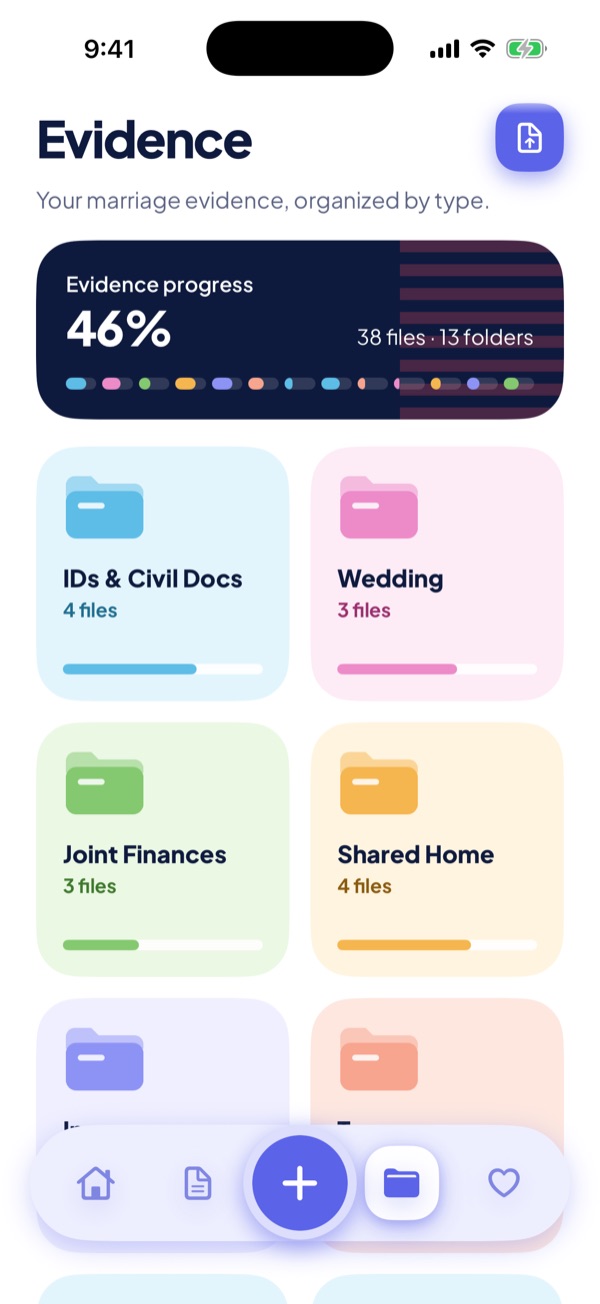
Spouseport Evidence screen: 38 files sorted into 13 folders such as IDs and civil documents, wedding, joint finances and shared home, with evidence progress at 46%.
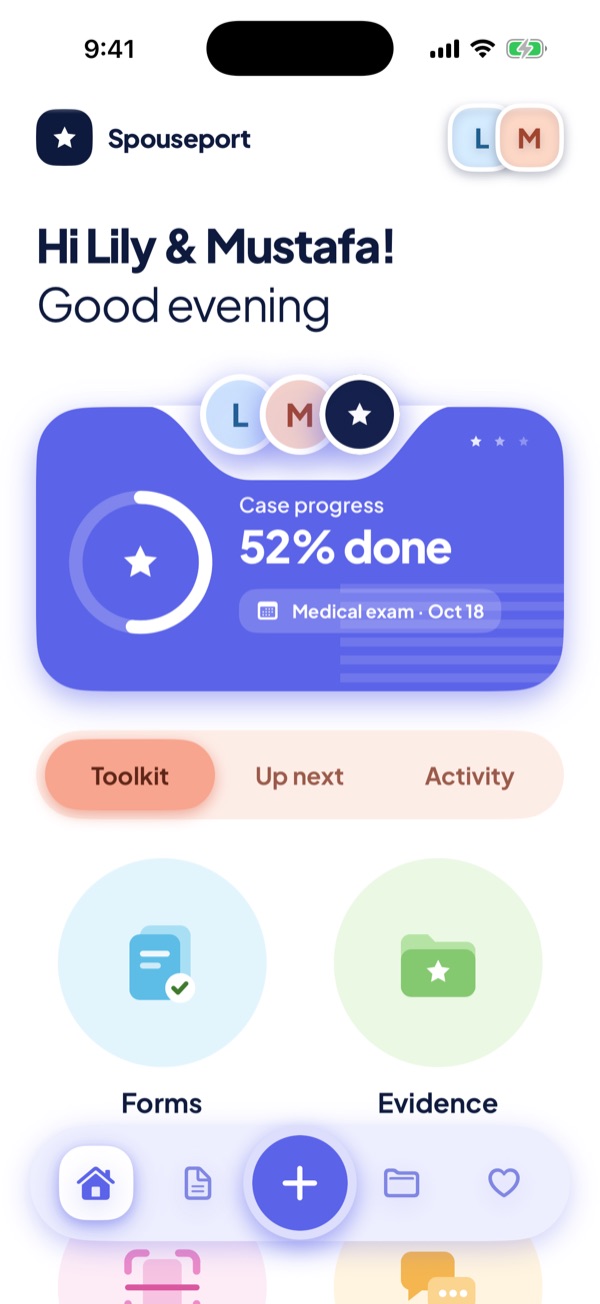
Spouseport Home screen for Lily and Mustafa: case progress at 52%, their next date (a medical exam on October 18) and shortcuts to Forms and Evidence.
  • Files stored encrypted
  • One case for both of you
  • No ads, no tracking
  • One-time Premium

What it does

Everything for your case in one calm place

The paperwork for a marriage-based green card is a lot. Spouseport keeps it organized, so the two of you always know where things stand.

Form checklists

Every form for your path in one checklist

Choose adjustment of status or consular processing and see the forms that go with it, like the I-130, I-130A, I-485 and I-864. Work through them section by section.

  • Private draft answers, encrypted and seen only by the people on your case
  • See who owns each form and how far along it is
  • A PDF of your draft answers to keep beside you while you fill in the forms

Draft answers are for your own preparation. Spouseport doesn’t check them or file anything for you.
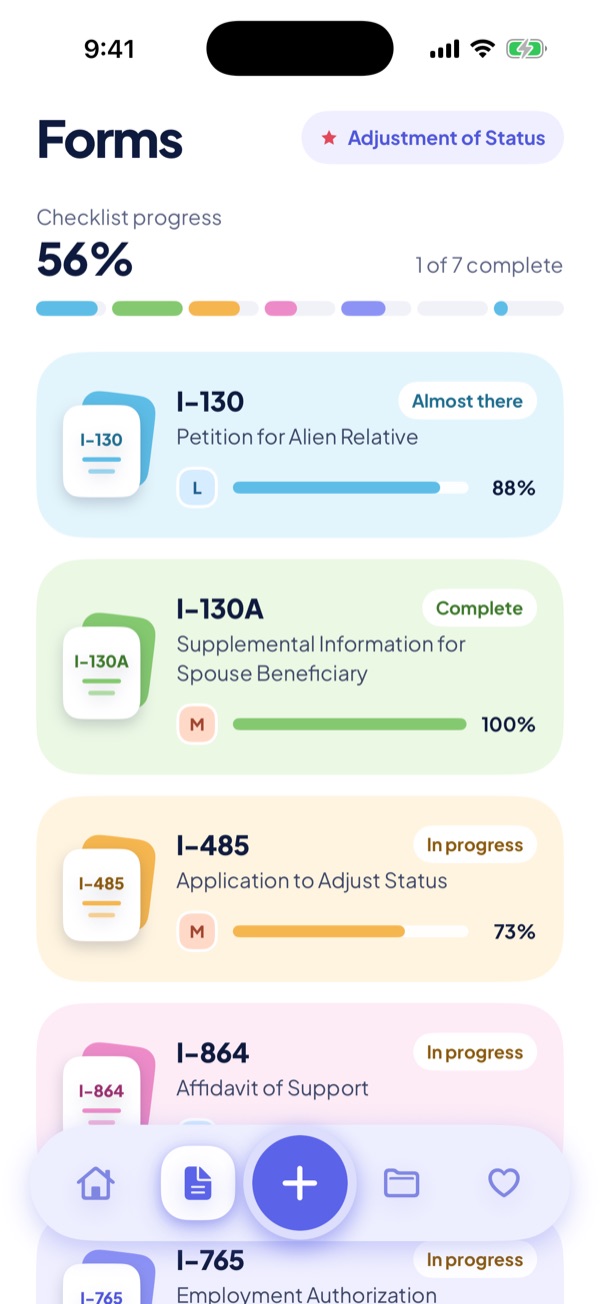
Forms screen for adjustment of status: checklist progress at 56%, with the I-130, I-130A, I-485 and I-864 and how far along each one is.

Evidence archive

Your evidence, sorted and encrypted

Thirteen folders, from IDs and civil documents to photos together, joint finances, your shared home and your relationship story. Each folder shows what it accepts and how it’s coming along.

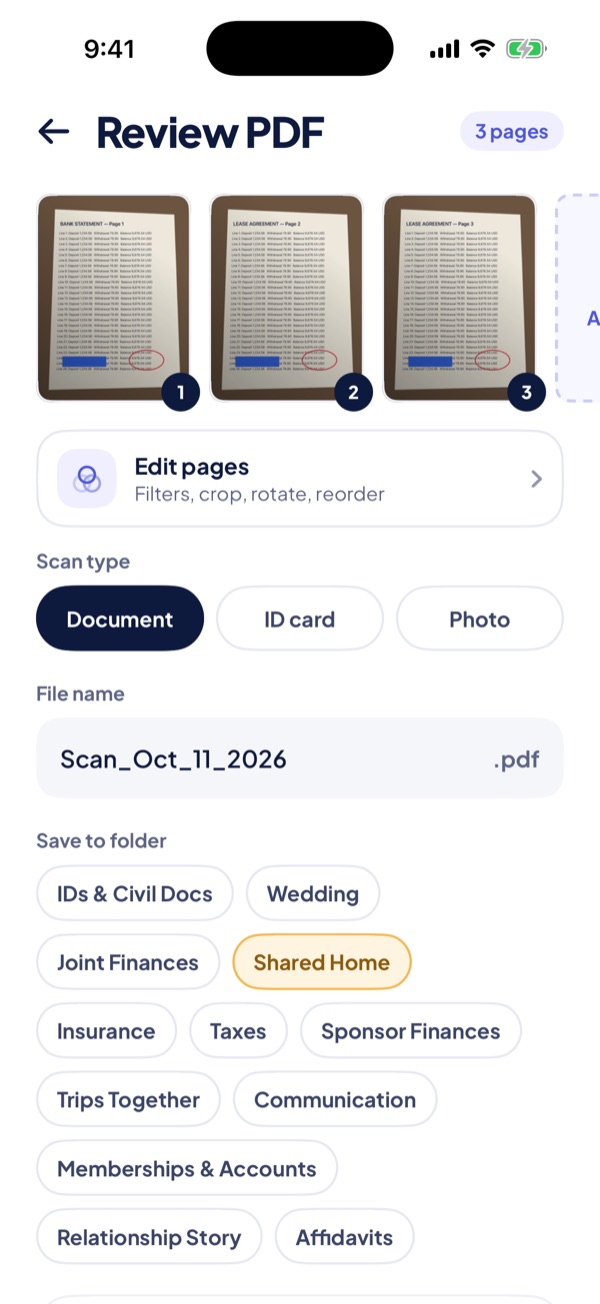
  • Built-in document scanner: turn paper into one clean, multi-page PDF
  • Captions under each photo, or a private note marked “Only me”
  • Every file stored encrypted on Spouseport’s own servers
Scanner review screen: three scanned pages saved as one PDF, with a file name, a scan type and a choice of folder.
Evidence screen with folder cards for IDs and civil documents, wedding, joint finances and shared home.

Interview practice Premium

Practice together at your own pace

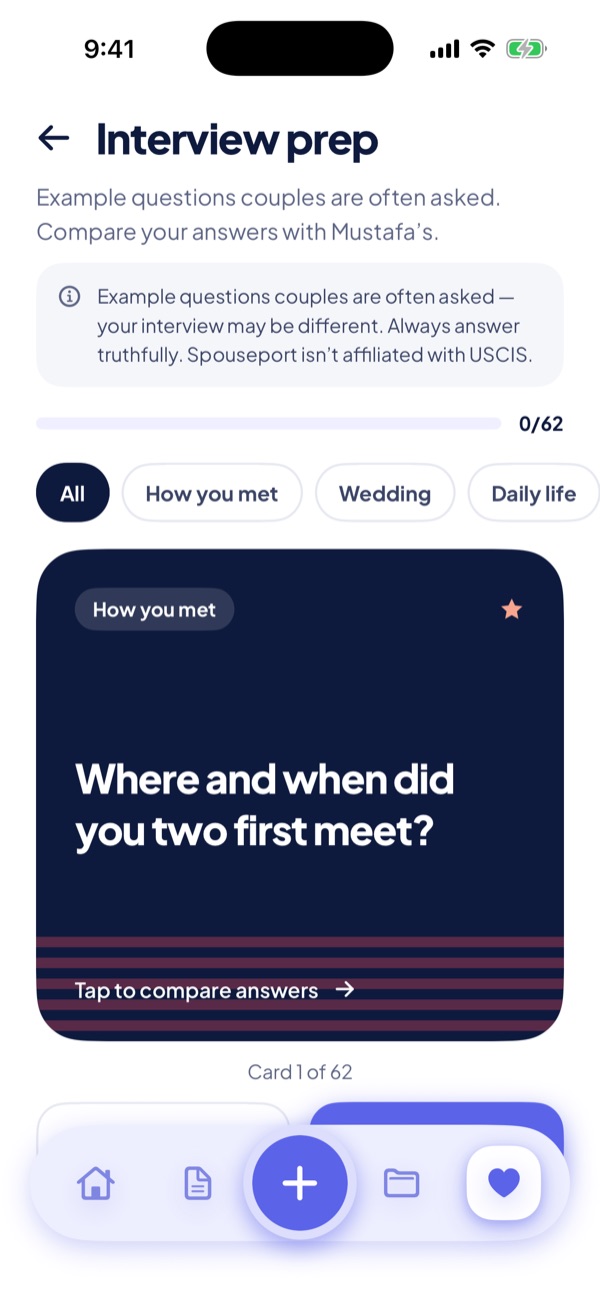
Go through example questions couples are often asked: how you met, the wedding, daily life. Each of you answers, then you compare your answers side by side.

  • Filter by topic and see how many cards you’ve gone through
  • Couple quizzes and a daily question to talk through your shared story

These are example questions. A real interview may be different. Spouseport doesn’t review or coach your answers. Always answer truthfully.

Interview prep screen with the example question “Where and when did you two first meet?”, topic filters, and a note that a real interview may be different.

Packet builder Premium

One print-ready PDF in the order you choose

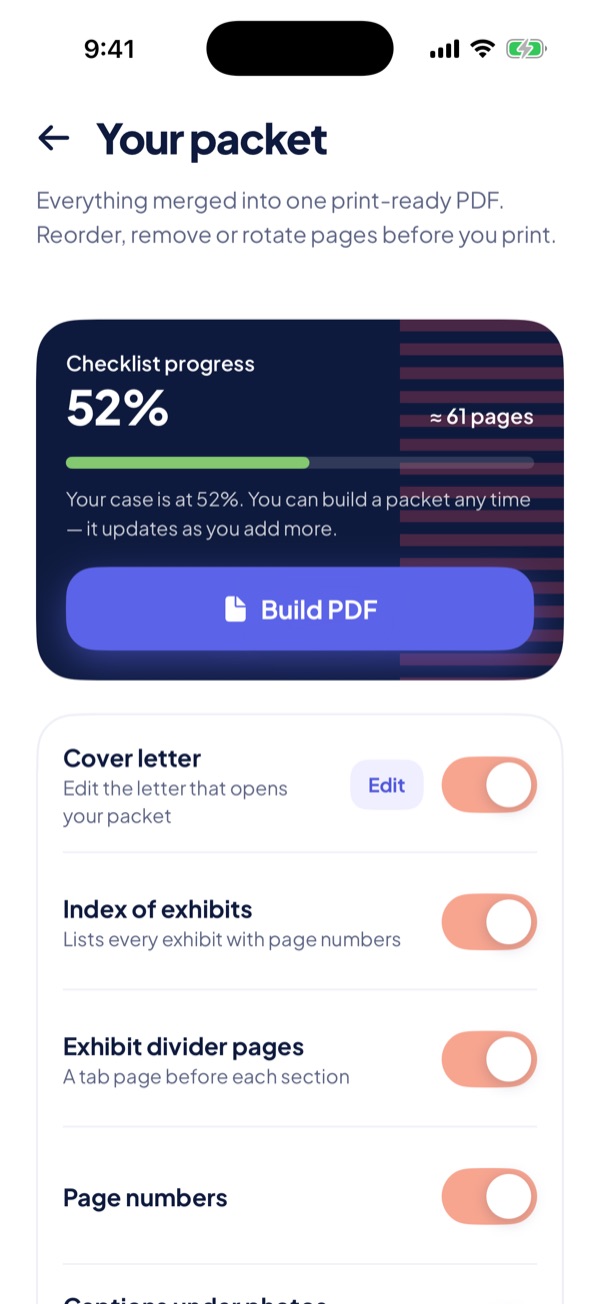
Merge your forms and evidence into a single PDF with a cover letter, an index of exhibits, divider pages, page numbers and your photo captions. Reorder sections, and rotate or skip pages before you print.

Spouseport merges what you add. It doesn’t review your packet or tell you what to file. Check the current filing instructions on uscis.gov before you send anything.

Packet screen: build one PDF of about 61 pages, with switches for a cover letter, an index of exhibits, divider pages and page numbers.
  • One case for both of you

    You and your spouse see the same folders, forms and progress, on iPhone or on the web. Invite your spouse, and a view-only preparer if you like, with Premium.

  • Save from any app

    Choose Spouseport in the iOS share sheet to save PDFs and photos from Files, Mail, Photos or your messages straight into the right folder.

  • Timeline and reminders

    See your case dates on one timeline. With Premium, add a shared calendar for anniversaries and appointments, plus gentle reminders for you, your spouse or both.

How it works

Three steps, side by side

  1. Start your case

    Create an account on iPhone or the web and choose your path: adjustment of status or consular processing. Your checklist is set up for you.

  2. Gather it together

    Scan documents, save files from the share sheet and draft answers section by section. With Premium, your spouse joins the same case and you both see every update.

  3. Print your packet

    Build one PDF with a cover letter, exhibit index and page numbers (Premium). Check the current instructions on uscis.gov, then file it yourself.

Privacy & security

Private by design

Your case holds some of the most personal documents you have. We treat it that way.

  • Encrypted on our own servers

    Files, thumbnails, draft answers and captions are stored encrypted (AES-256-GCM) on Spouseport’s own servers and sent over encrypted connections.

  • Only the two of you

    Only the people on your case can open your files: you, your spouse and a view-only preparer if you invite one. Captions marked “Only me” stay with you.

  • Every staff view is logged

    A small safety team can review files for moderation and to help you when you ask. Every view is recorded in an audit log.

  • No ads, no tracking

    No ads, no third-party analytics, and we never sell your data. This website doesn’t use cookies or trackers either.

Read the Privacy Policy

Free & Premium

Start free and unlock the rest once

Premium is a one-time purchase in the iOS app. It’s not a subscription, and one purchase covers both of you.

Free

Everything you need to start organizing.

  • Evidence archive: files, photos, memories and captions
  • Document scanner (camera to PDF)
  • Form checklists and draft answers
  • Case timeline
  • “Save to Spouseport” from the iOS share sheet
  • Web dashboard in any browser
  • 250 MB of storage per case

One-time purchase

Premium

Everything in Free, plus:

  • Invite your spouse, and an attorney or preparer (view-only)
  • Interview practice with example questions
  • Couple quizzes and a daily question
  • Packet builder: one print-ready PDF
  • Shared calendar and reminders
  • Weekly goals and the shared-life checklist
  • Scan editor: filters, crop, rotate and reorder
  • 5 GB of storage per case

One-time purchase · No subscription · Covers you and your spouse

The web dashboard works in any browser. Premium is unlocked in the iOS app and shows up on the web automatically.

The App Store shows the price in your currency before you buy. Premium is a software feature set, not legal services.

FAQ

Good questions

Is Spouseport legal advice?

No. Spouseport is an organizing tool, not a law firm, and doesn’t give legal advice. It isn’t affiliated with USCIS, the Department of State or any government agency.

It doesn’t file anything with any agency for you, and it doesn’t review your answers, your evidence or your packet. For advice about your situation, talk to a licensed immigration attorney or a DOJ-accredited representative, and check the current rules on uscis.gov.

Who can see my files?

Only the people on your case: you, your spouse once they join, and any view-only preparer you invite. Captions you mark “Only me” are visible only to you.

Files are stored encrypted on Spouseport’s own servers. A small safety team can review files for moderation and support, and every view is recorded in an audit log. There are no ads and no tracking, and we never sell your data. The Privacy Policy has the details.

Does it work for adjustment of status and consular processing?

Yes. When you set up your case you choose your path, and Spouseport shows the matching checklist. For adjustment of status that includes forms like the I-130, I-130A, I-485, I-864, I-765, I-131 and I-693. For consular processing it covers the I-130 and I-130A, the National Visa Center steps, the DS-260, the I-864, civil documents and the medical exam.

Spouseport is built for spouses of U.S. citizens. If your spouse is a green card holder, the steps are different: check uscis.gov or talk to an immigration attorney.

Is there an Android app?

Not yet. On Android, or on any computer, use the web dashboard in your browser: your evidence archive, form checklists, draft answers and packet are all there. Premium is unlocked in the iOS app, and once either of you has it, it shows up on the web too.

Can my spouse join?

Yes. Inviting is part of Premium. Once either of you unlocks it in the iOS app, share the invite code from the app or the dashboard. Your spouse signs up on iPhone or the web, enters the code and joins the same case. One purchase covers both of you.

Is Premium a subscription?

No. Premium is a one-time purchase in the iOS app, paid through your Apple ID. It’s saved to your Spouseport account and unlocks every Premium feature for your whole case. Refunds are handled by Apple.

How do I delete my account?

Any time. In the iOS app, go to Case & account → Account → Delete account. On the web dashboard, go to Account → Delete my account. You can also email support@spouseport.com.

Deleting your account removes your sign-in details, the files you uploaded and your private answers and notes. If your spouse stays on the case, the shared form answers stay with them. When the last spouse leaves, the whole case and all its files are deleted.

Still have a question?

Write to us about the app, your account or Premium. For your privacy, please don’t attach case documents.

support@spouseport.com

Start organizing together

Get the iPhone app, or open your dashboard on the web.